Chrome side panel tabs
Chrome's side panel is the most useful piece of screen space in your browser. A useful setup turns it into a vertical tab list with spaces, folders, and pins — visible next to the page you're working on.
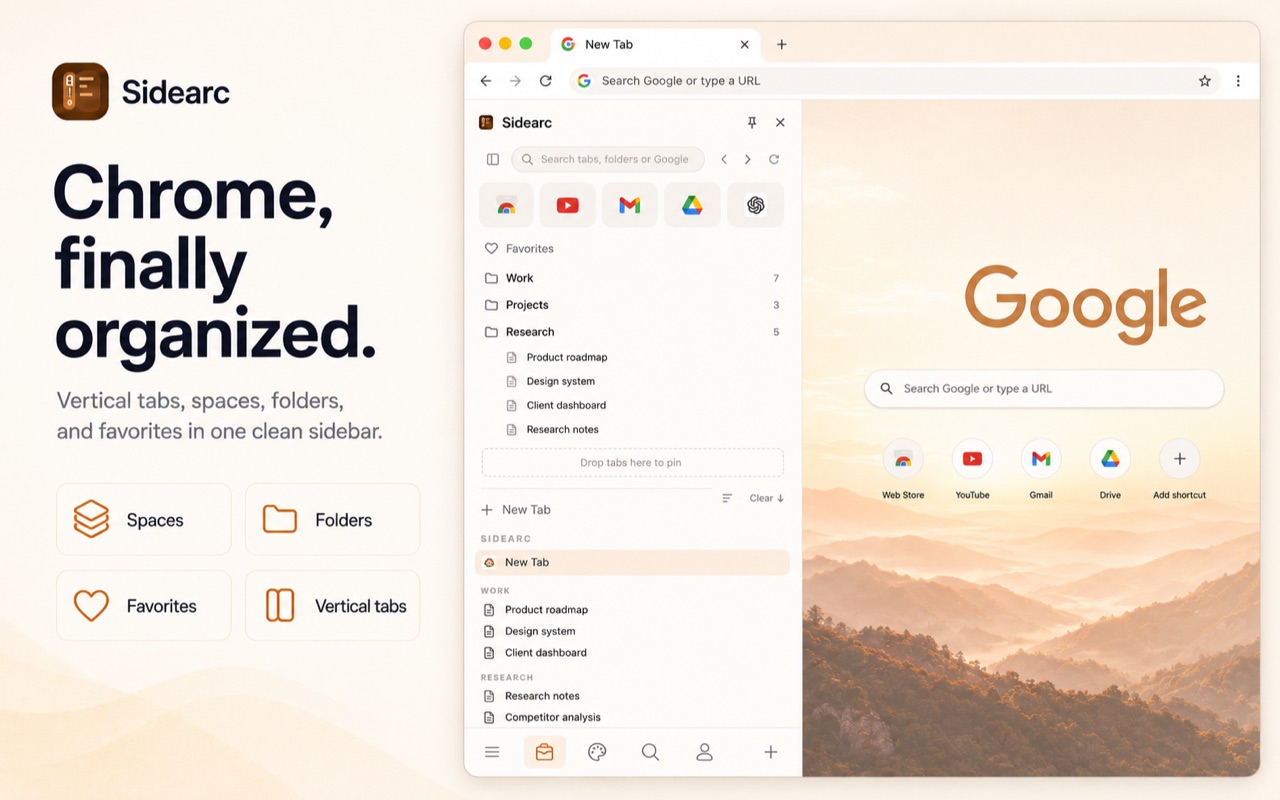
Your tabs stay visible in the side panel while you browse
Why the side panel works
The horizontal tab strip disappears behind favicons once you have 10+ tabs. The side panel uses vertical space — each tab gets its full title, and you can see your tab list while reading the current page. No switching back and forth.
What belongs in the side panel
- Vertical tabs — full titles, favicons, close buttons, active state highlighting
- Spaces — switch between project contexts with a click or horizontal swipe
- Folders — nested folders per space for saved links and recurring references
- Pins — core tools stay at the top of each space
- Search — filter tabs or search Google directly from the panel
Side panel vs separate window
Some tab managers open in a separate window or popup. A native side-panel tool stays docked in Chrome's side panel, so your tabs are always one Cmd+B / Ctrl+B away — no extra windows to manage.
FAQ
Can I put tabs in Chrome's side panel?+
Yes. Extensions like SideArc use Chrome's side panel to show tabs vertically next to the current page.
Why is the side panel better than the top tab strip?+
It uses vertical space, which means you can read full titles and keep your tab list visible while working on the page.
Does SideArc only show open tabs in the side panel?+
No. It also gives you pins, folders, and spaces, so the side panel becomes a workspace, not just a mirror of open tabs.
Will the side panel slow Chrome down?+
In normal use, no. SideArc works as a lightweight side panel layer and helps reduce chaos from keeping too many tabs scattered around.