Arc browser alternative for Chrome
Arc gave you vertical tabs, spaces, and a calmer browser. But Arc requires switching browsers. A Chrome extension can add the same pattern: vertical tabs in a side panel, spaces for projects, folders for saved links, and pins for core tools.
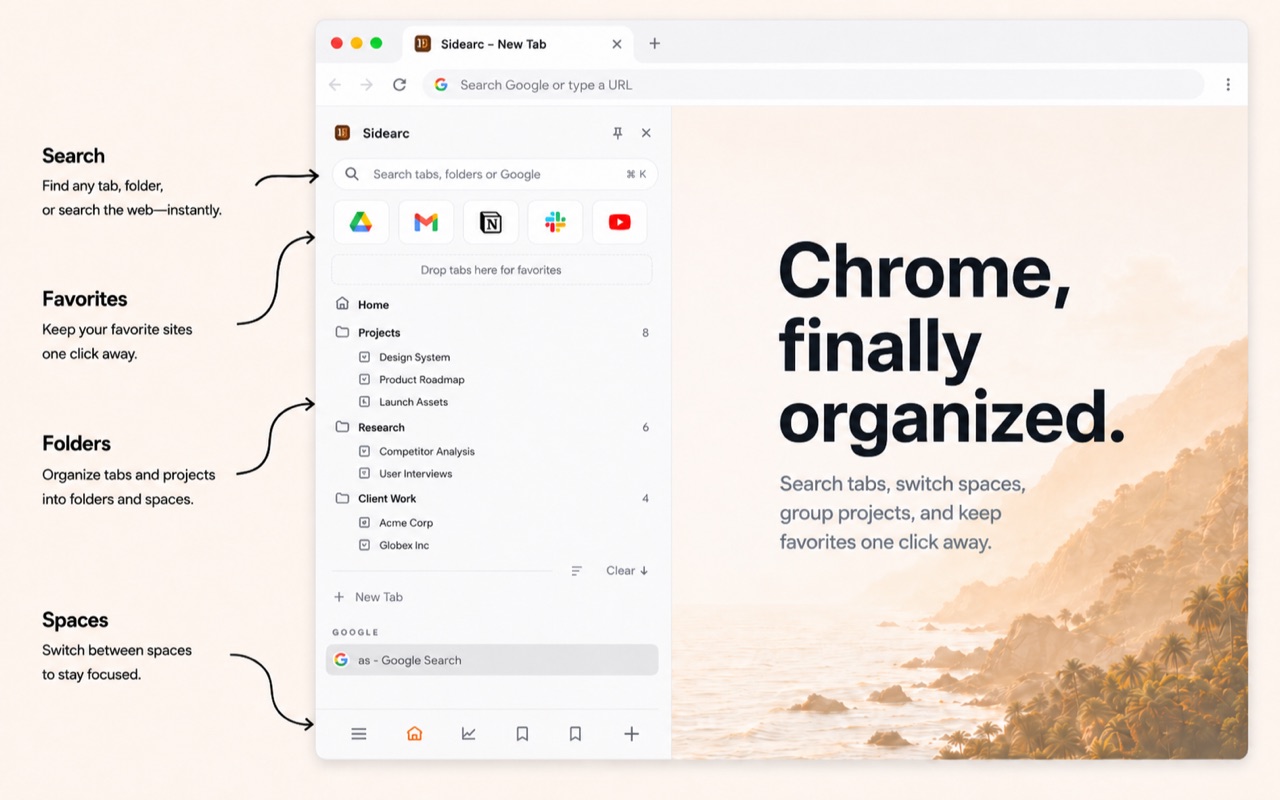
Vertical tabs, spaces, and pins — inside Chrome
What Arc users miss in Chrome
- Vertical tabs — full titles instead of tiny favicons
- Spaces — separate contexts for work, personal, and side projects
- Pinned tools — core pages always visible at the top
- Calmer layout — the browser as a workspace, not a cluttered strip
How to get the same workflow in Chrome
- Vertical tabs in a side panel — full titles, drag-and-drop, close buttons
- Spaces — separate contexts with their own tabs, pins, and folders
- Folders — save links into nested folders per space
- Pins — keep core tools at the top of each space
- Chrome tab group sync — spaces can mirror Chrome's native tab groups
- Swipe navigation — swipe horizontally to switch spaces
Why stay in Chrome?
Chrome has the largest extension ecosystem, the best DevTools, and the widest enterprise compatibility. SideArc adds workspace features without giving up Chrome's strengths. Your existing extensions, profiles, and settings all keep working.
FAQ
What is the best Arc browser alternative for Chrome?+
If you want Arc-style organization without leaving Chrome, SideArc is a strong fit because it adds vertical tabs, spaces, pins, and folders in Chrome's side panel.
Can I get Arc-style spaces in Chrome?+
Yes. SideArc adds spaces for separate projects and contexts, so you can keep Work, Research, and Personal browsing isolated inside Chrome.
Why use SideArc instead of switching browsers?+
You keep Chrome compatibility, extensions, profiles, and habits, while still getting a calmer workspace with vertical tabs and project separation.
Does SideArc feel like Arc or just another sidebar?+
It is closer to an Arc-style workflow than a simple sidebar because it adds spaces, folders, pins, and drag-and-drop organization, not just a vertical list.