
Turn Chrome into a browser workspace
When Chrome is where you do most of your work, it needs to act like a workspace — not a temporary browsing tool. The missing structure is spaces for separate projects, folders for saved links, pins for core tools, and vertical tabs for navigation.
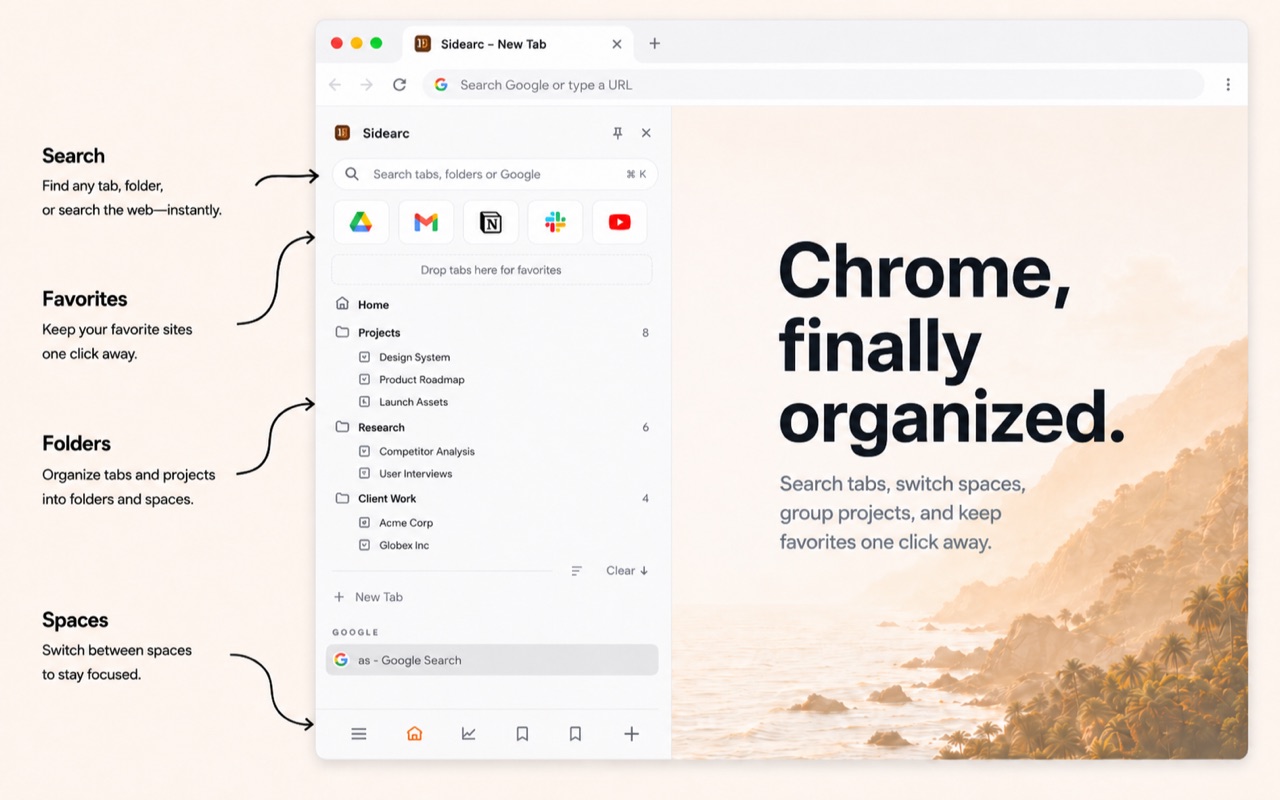
Spaces, folders, pins, and vertical tabs — Chrome as a workspace
What a browser workspace needs
- Project separation — don't mix work tabs with personal browsing
- Persistent structure — pins and folders that survive across sessions
- Readable navigation — full tab titles, not truncated favicons
- Fast context switching — move between projects without hunting
A practical workspace setup
A tool like SideArc turns Chrome's side panel into a workspace. Each space is a separate context with its own tabs, pins, and folders. Switch spaces with a click or swipe. Tabs open in the current space and stay there. Your browser stops being one giant list and starts being a navigable work surface.
Why windows and tab groups aren't enough
Multiple windows scatter your work across the desktop. Tab groups cluster tabs but don't persist across sessions or support folders and pins. A workspace needs all three: separation, persistence, and navigation. A Chrome side-panel workspace can do that.
FAQ
What is a browser workspace?+
A browser workspace is a structured browsing setup where projects, tools, and references are separated instead of mixed into one tab strip.
How do I turn Chrome into a workspace?+
Create separate spaces, pin core tools, save recurring links into folders, and keep active tabs in a readable vertical list.
Who benefits most from a browser workspace?+
People who spend most of their workday in Chrome, especially developers, researchers, founders, PMs, and anyone switching across several tools.
Does SideArc make Chrome feel more like a dedicated work tool?+
Yes. It adds the structure Chrome is missing by default, so work feels organized instead of improvised.