Arc vs SideArc
Arc is a full browser built around spaces and vertical tabs. An extension-based approach keeps Chrome's extensions, profiles, DevTools, and sync.
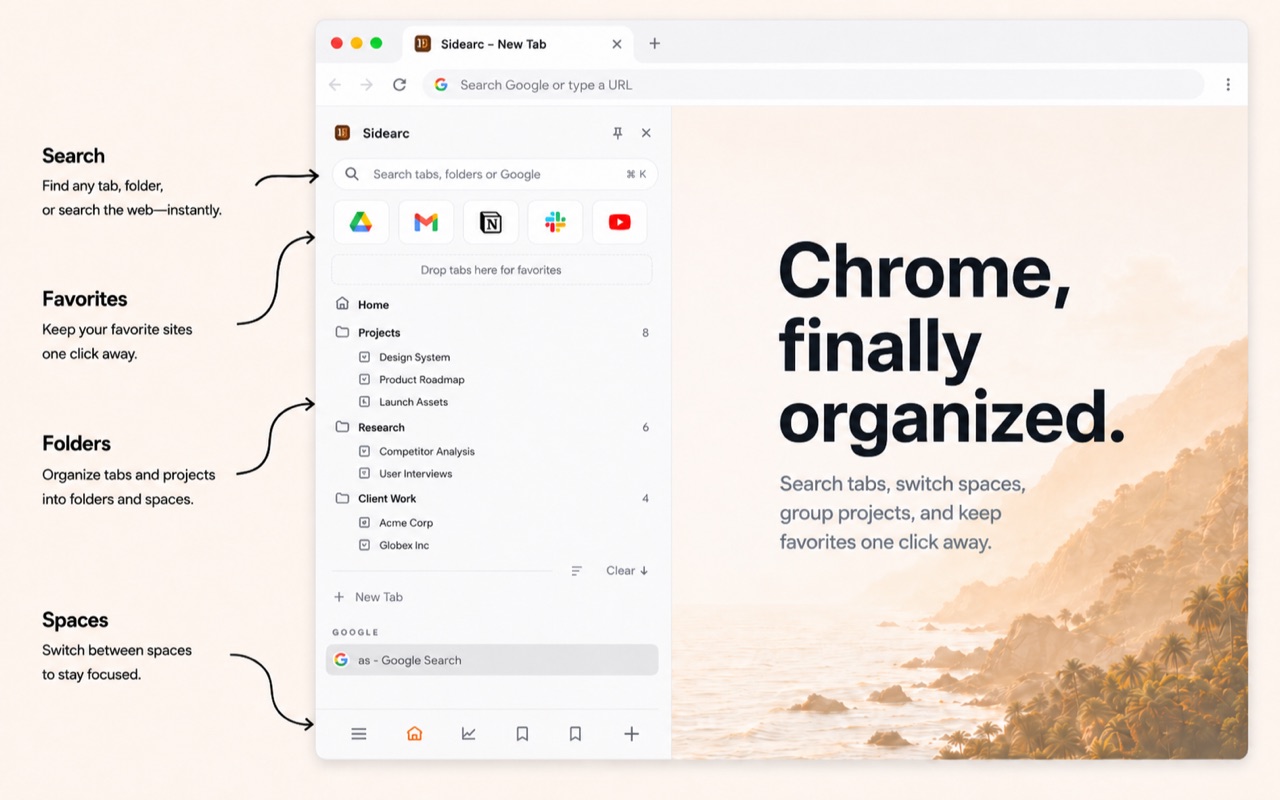
Spaces, vertical tabs, pins, and folders without switching browsers
Choose Arc if you want a new browser
Arc is best when you want the whole browsing environment to change: browser chrome, navigation habits, profiles, and workspace model.
Choose a Chrome extension if you want less disruption
- Vertical tabs in Chrome's side panel
- Spaces for work, research, personal, and side projects
- Pins and folders for tools and reusable links
- Chrome compatibility for extensions, profiles, sync, and DevTools
The practical difference
Arc changes the browser. SideArc changes the Chrome workflow. If Chrome already works for your tools, SideArc is the lower-friction move.
FAQ
What is the difference between Arc and SideArc?+
Arc is a full browser. SideArc is a Chrome extension that adds Arc-style vertical tabs, spaces, pins, and folders while keeping Chrome.
Should I use Arc or SideArc?+
Use Arc if you want a full browser switch. Use SideArc if you want the calmer Arc workflow without losing Chrome extensions, profiles, and DevTools.
Can SideArc replace Arc spaces in Chrome?+
For many Chrome users, yes. SideArc spaces separate projects and keep each context organized with tabs, pins, and folders.
Is SideArc free to try?+
Yes. SideArc is free with up to 2 spaces, so you can test the workflow before upgrading.