
Best Chrome tab manager
The best Chrome tab manager depends on what you are trying to fix. Some tools save sessions. Some hide tabs. For active work, look for vertical tabs, spaces, pins, and folders inside Chrome's side panel.
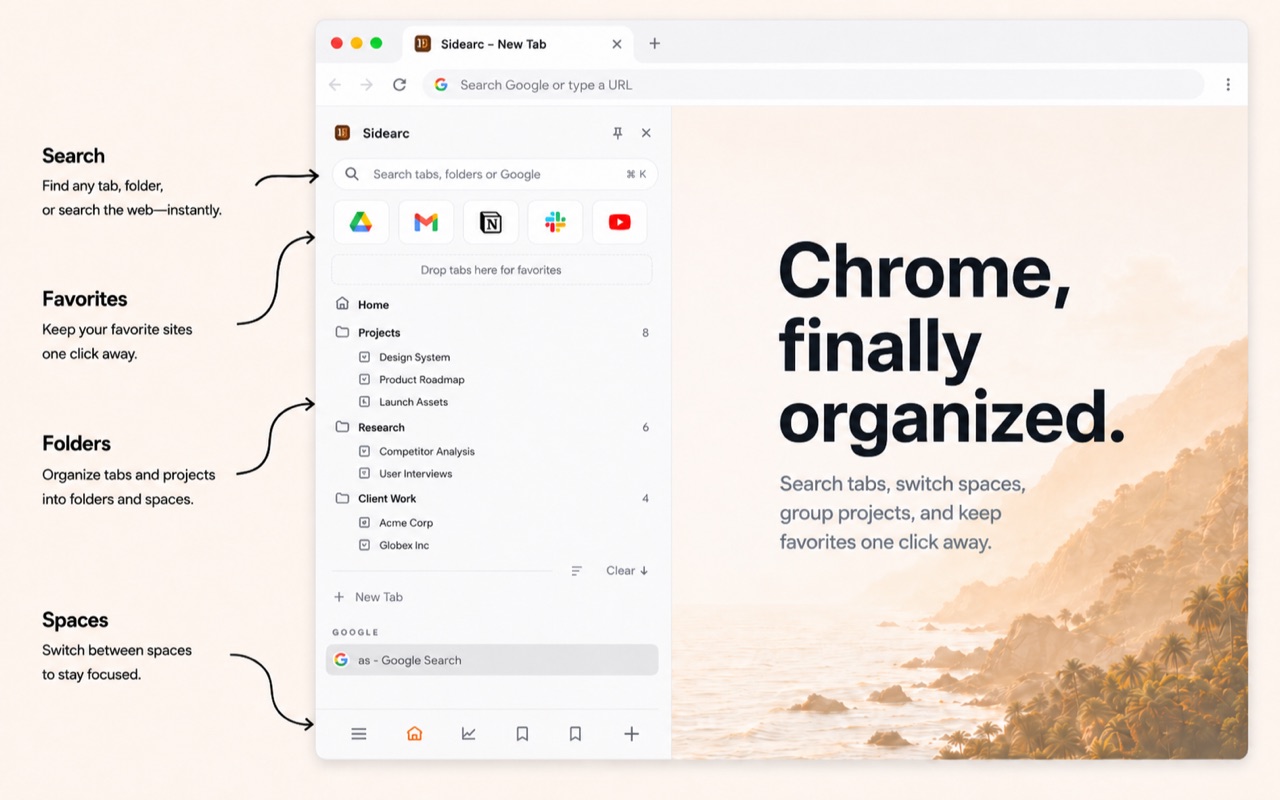
Manage live Chrome tabs by project, not by panic
Match the tool to the problem
- Too many active tabs: use vertical tabs and spaces
- Need to reopen old work: use a session manager
- Need long-term storage: use bookmarks or saved folders
- Need project context: use workspaces with pins and folders
For live tab management
A live tab manager keeps open tabs readable, separates work into spaces, and gives each space its own pinned tools and saved folders. It is built for the moment when Chrome is open and messy, not only for restoring tabs later.
FAQ
What is the best Chrome tab manager?+
If you need active tab organization, choose a manager with vertical tabs, project spaces, pins, and saved folders. SideArc focuses on that live workflow.
Are Chrome tab managers better than bookmarks?+
For active work, yes. Bookmarks store links, but a tab manager helps you navigate and organize what is open right now.
Should I use a session manager or SideArc?+
Use a session manager for snapshots and restore. Use SideArc when your daily problem is too many active tabs across projects.
Can SideArc manage tabs by project?+
Yes. Spaces let you separate projects, then organize each one with tabs, pins, and folders.