
Guide
How to stop doomscrolling
Doomscrolling isn't a willpower problem. It happens because Instagram's feed has no natural stopping point. Reels autoplay, suggested posts keep appearing after your followed content ends, and ads fill every gap. Remove those, and doomscrolling stops.
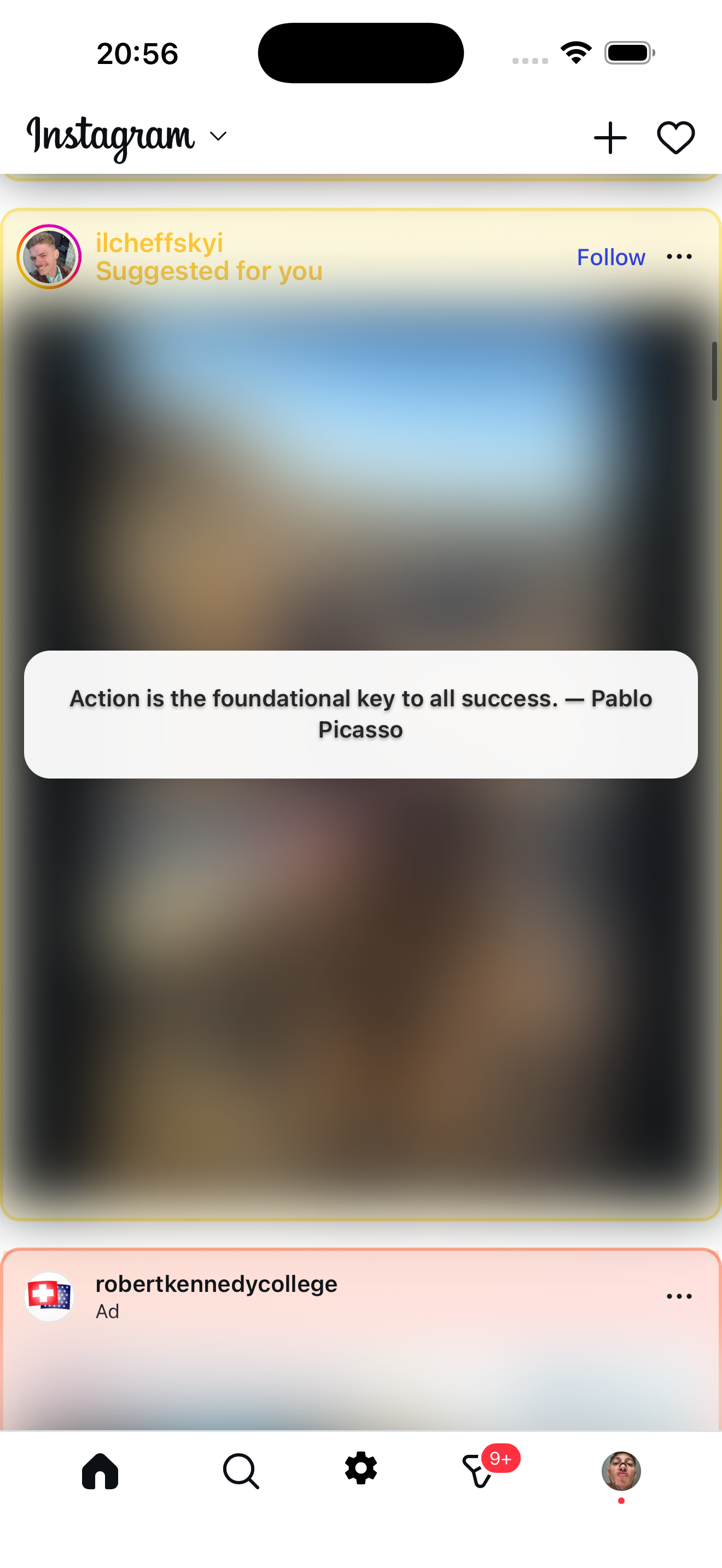
Scroll interrupted
Instead of the next suggested post, you see a quote
Why doomscrolling happens
Instagram's feed is designed to never end. When you run out of posts from people you follow, it starts showing suggested posts from accounts you don't follow. Then reels autoplay. Ads fill gaps. There's no natural place to stop.
What Zen Social does
Zen Social opens Instagram inside a filtered browser and removes the three things that make the feed endless:
- Blocks reels — short videos that create the fastest scroll loop.
- Blurs suggested posts — content from accounts you don't follow gets hidden and replaced with fun facts, quotes, or language phrases.
- Removes ads — sponsored posts that extend every session.
The result: your feed is mostly posts from people you follow. It runs out of content naturally. You check what you came for and put the phone down.
You don't have to delete Instagram
Messages, stories, and posts from followed accounts all work normally. Zen Social only removes the algorithmic content that causes doomscrolling.
Not affiliated with Instagram or Meta.
Related: app to stop doomscrolling, how to make Instagram less addictive, how to disable reels.