
Comparison
Best app to stop Instagram scrolling
There are two types of tools: apps that block Instagram entirely, and apps that filter the feed so you can still use it without the addictive parts. The best choice depends on whether you still need messages, stories, and followed accounts.
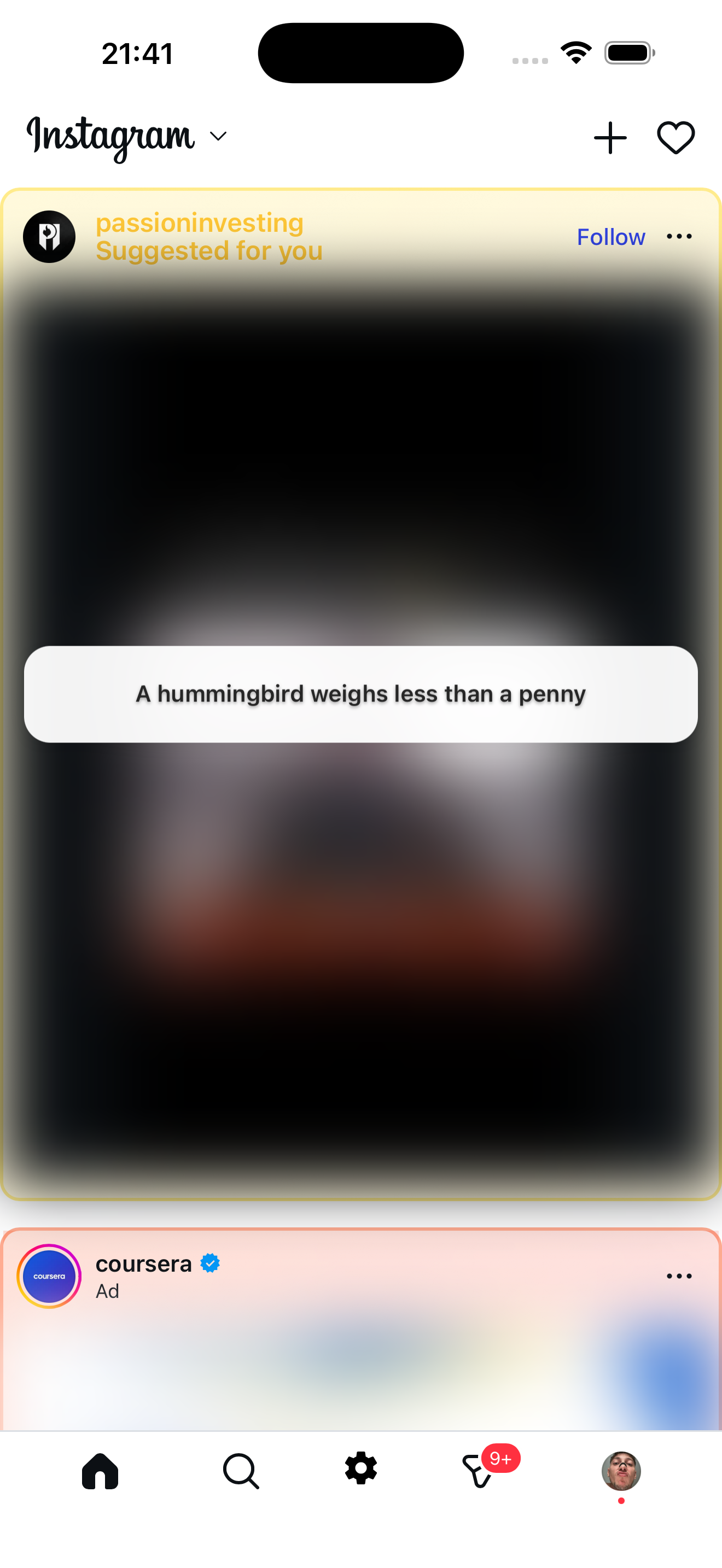
Feed filter approach
Zen Social keeps Instagram usable but removes the junk
Option 1: Full blockers
Apps like One Sec, ScreenTime, or Cold Turkey block or delay access to Instagram entirely. Good if you want a hard boundary. The tradeoff: you also lose messages, stories, and any intentional use.
Option 2: Feed filters (Zen Social)
Zen Social takes a different approach. Instead of blocking Instagram, it opens Instagram inside a filtered browser and removes the parts that cause compulsive scrolling:
- Reels blocked — short videos never load.
- Suggested posts blurred — content from accounts you don't follow is hidden and replaced with facts, quotes, or language tips.
- Ads removed — sponsored posts filtered out of the feed.
- Messages and stories work — DMs, followed accounts, and posting all function normally.
Which approach is better?
- Choose a full blocker if you want zero Instagram access during certain hours or need hard limits.
- Choose Zen Social if you still use Instagram for messages, creators, or posting, but want the algorithmic feed cleaned up.
Many people use both: Zen Social for everyday use, and a time-based blocker for late-night hours.
Not affiliated with Instagram or Meta.
Related: Zen Social vs UNDOOMED, app to stop doomscrolling.